
Buying scrap materials online used to require endless calls, negotiations, and supplier hunting. Platforms like ScrapTrade simplify this process through reverse bidding, allowing buyers to publish purchase requests and let sellers respond with offers.
If you’re a recycler, manufacturer, or scrap buyer looking to source materials efficiently, understanding how reverse bidding works on ScrapTrade is essential.
This detailed guide walks you through the entire process from logging into your account to creating a Buyer Offer (Reverse Bid) and connecting with sellers.
Step 1: Login to Your ScrapTrade Account
Before creating a reverse bid, you need to log in to your account.
Steps to Login
- Visit the official website
https://scraptrade.com.au - Click Login on the homepage. https://scraptrade.com.au/login
- Enter your registered email address.
- Click Continue.
You can then log in using either:
- OTP login
- Password login
Once authenticated, you will be redirected to your ScrapTrade dashboard.
Your dashboard is where you manage:
- Bid Now (Listings)
- Create offer – Reverse bids
- Seller interactions
- Purchase inquiries
Step 2: Navigate to Buyer Offer (Create Offer – Reverse Bidding)
After logging into your dashboard, look for the Create Offer – Reverse Bidding option.
This feature allows buyers to submit reverse bids, meaning:
Instead of sellers listing scrap first, buyers publish what they want to buy, and sellers respond.
This approach helps buyers:
- Source specific scrap materials
- Receive competitive offers
- Connect with multiple sellers quickly
Click Create Buyer Offer to begin.
Step 3: Fill in Basic Details
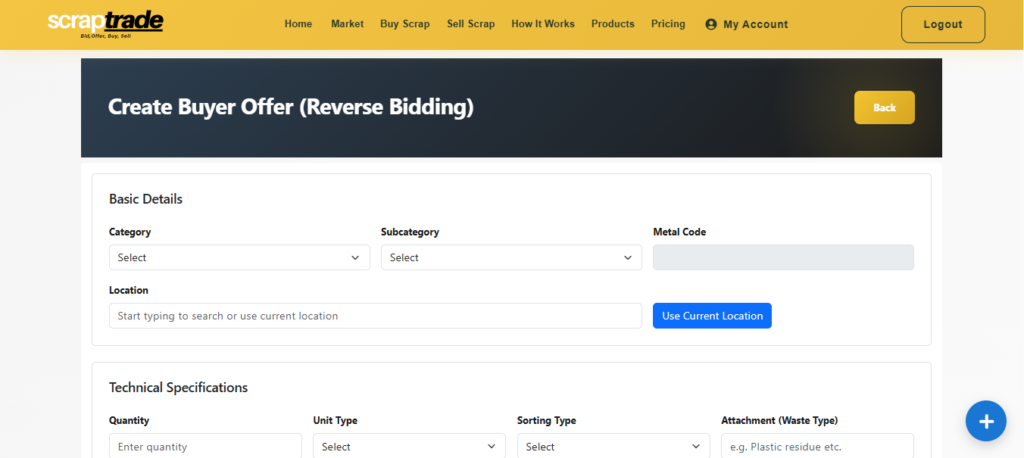
The first section you’ll see is Basic Details.
This helps categorize your buying request so sellers can easily find it.
Fields to Complete
Category
Select the relevant material category.
Example:
Specialized Materials
Subcategory
Choose the specific type of scrap.
Example:
Tires & Rubber
Metal Code
Select the appropriate classification code.
Example:
SP-RUB
Metal codes help standardize scrap material identification across the marketplace.
Location
Enter the location where you want the material delivered or sourced.
You can:
- Start typing to search your location
- Use your current location
Location helps sellers determine logistics and delivery feasibility.
Step 4: Add Technical Specifications
Next, complete the Technical Specifications section.
This section defines the exact material quality and requirements.
Quantity
Enter the amount of material you want to purchase.
Example:
- 1000 KG
- 5 tons
Unit Type
Select the measurement unit.
Examples include:
- KG
- Gram
- Tons
Sorting Type
Choose how the scrap should be prepared.
Options may include:
- Sorted
- Unsorted
Sorted materials usually have higher quality and less contamination.
Attachment (Waste Type)
Specify any unwanted material attached to the scrap.
Example:
- Plastic residue
- Rubber components
- Paint or coatings
Providing this information prevents quality disputes later.
Waste Percentage Range
Select the acceptable waste percentage.
Example:
- 0–2%
- 2–5%
- 5–10%
Lower waste percentages typically indicate higher-quality scrap.
Hazard Declaration
You must declare whether the material is:
- Non-Hazardous
- Hazardous
This declaration is important for safety, compliance, and transportation requirements.
Step 5: Add Product Information
Now move to the Product Information section.
This explains exactly what you want to purchase.
Product Name
Add a clear title for your buying request.
Example:
Rubber Tire Scrap for Recycling – Bulk Purchase
Description
Write a detailed description explaining:
- Material quality
- Expected condition
- Delivery requirements
- Intended use
Example:
We are looking to purchase rubber tire scrap for recycling purposes. Materials should be clean with minimal contamination and suitable for processing.
A well-written description attracts serious sellers and better offers.
Step 6: Product Specifications
This section allows you to include additional technical specifications if available.
Examples may include:
- Density
- Grade
- Processing requirements
- Size or dimensions
If no specifications are required, this section can be left empty.
Step 7: Configure Offer Pricing
Next comes the Offer Pricing section.
This determines how sellers evaluate your purchase request.
Unit
Select the pricing unit.
Example:
- KG
- Ton
Currency
Choose your preferred currency.
Common options include:
- AUD
- USD
Estimated Price
Enter the approximate price you expect to pay.
This helps sellers understand the market expectation.
Price per Unit
Specify the price per unit of material.
Example:
$0.50 per KG
Maximum Buying Price
This is the highest price you are willing to pay.
Setting this helps sellers submit competitive offers within your budget.
Step 8: Define Shipping & Trade Terms
Next, configure Shipping & Trade Terms.
This section defines the transaction conditions.
Incoterms
Select the applicable international trade term.
Examples:
- EXW
- FOB
- CIF
Incoterms clarify who handles shipping responsibilities.
Payment Terms
Choose how payment will be made.
Common options:
- Bank Transfer
- Stripe
Dispatched Lead Time
Enter the number of days required for dispatch after order confirmation.
Example:
- 3 days
- 7 days
This helps sellers plan logistics.
Step 9: Upload Product Media
You can upload a Product Image to visually represent the type of scrap you want to purchase.
This could include:
- Example material photos
- Reference images
- Specification diagrams
Images help sellers better understand your requirements.
Step 10: Add Frequently Asked Questions
You can also include Frequently Asked Questions (FAQs) to address common seller queries.
Example FAQs:
Q: What is the minimum supply quantity?
A: Minimum supply is 500 KG.
Q: Do you require sorted materials?
A: Yes, sorted materials with minimal contamination.
FAQs help reduce unnecessary back-and-forth communication.
Step 11: Accept Terms & Conditions
Before submitting your buyer offer, you must accept the platform terms.
Tick the checkbox:
“By using this platform, I agree to the Terms & Conditions.”
This confirms you understand and accept the platform rules.
Step 12: Save or Submit Your Reverse Bid
You now have two options:
Save as Draft
Use this if:
- You want to edit details later
- You are still preparing your requirements
Save (Submit)
Click Save to submit your reverse bid.
Once submitted:
- Sellers can discover your request
- Sellers can contact you
- Sellers may submit offers or bids
How Buyers Can Reach Sellers on ScrapTrade
Once your reverse bid is live, sellers who have relevant materials can respond.
Buyers and sellers can connect through:
- Listing responses
- Platform messaging
- Offer submissions
This allows both parties to negotiate and finalize deals directly through the platform.
Why Reverse Bidding is Powerful for Buyers
Reverse bidding gives buyers strong market leverage.
Instead of searching for suppliers, you simply publish your demand, and sellers compete.
Benefits include:
- Faster sourcing
- Competitive pricing
- Access to multiple suppliers
- Transparent negotiations
This approach is widely used in modern B2B marketplaces.
FAQs
What is reverse bidding on ScrapTrade?
Reverse bidding allows buyers to post purchase requests so sellers can submit offers to fulfill the demand.
Can buyers set a maximum price?
Yes. Buyers can set a maximum buying price, which defines the highest amount they are willing to pay.
Can I edit my buyer offer later?
Yes. If saved as a draft, you can edit it before submitting.
Do I need to upload images?
Images are optional but recommended because they help sellers understand your requirements.
Conclusion
Creating a reverse bid on ScrapTrade is a powerful way for buyers to source scrap materials quickly and efficiently. By clearly defining your material specifications, pricing expectations, and trade terms, you can attract reliable sellers and secure better deals.
Once your buyer offer is submitted, sellers can respond with offers, helping you compare suppliers and choose the best option.
If you’re actively sourcing scrap materials, reverse bidding can significantly simplify your procurement process.