

Once you’ve created a scrap listing on ScrapTrade, the next step is managing offers from interested buyers. Buyers can submit bids for your scrap listing, and as a seller you have the option to accept, reject, or counter those offers.
Understanding how to properly review and respond to buyer offers ensures you get the best value for your scrap while maintaining smooth transactions.
This step-by-step guide explains how to accept bids from buyers on ScrapTrade, how to review offer details, and what happens after accepting a bid.
Step 1: Login to Your ScrapTrade Account
First, log in to your ScrapTrade account.
Steps to Login
- Visit the website
https://scraptrade.com.au - Click Login.
- Enter your registered email address.
- Choose one of the login methods:
- Login with OTP
- Login with Password
Once logged in, you will land on your dashboard, which is your main control panel for managing listings and offers.
Step 2: Go to the Dashboard
From the dashboard, you’ll see the main navigation menu with options such as:
- Profile Verification
- Create Bid
- Manage Stock
- Seller Bids
- View Orders
- Requested Bids
- Requested Bid Orders
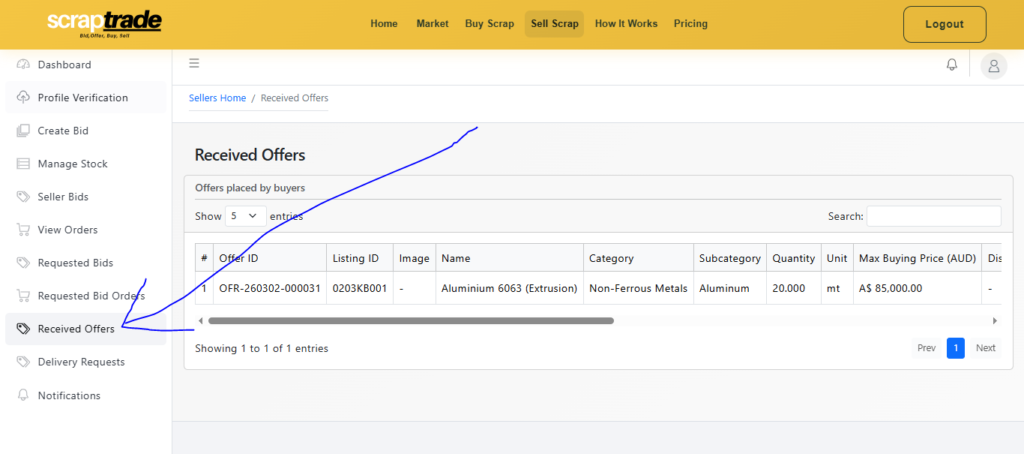
- Received Offers
- Delivery Requests
- Notifications
To manage buyer offers, click Received Offers.
Step 3: Open the Received Offers Section
Inside the Received Offers page, you will see a table showing all offers submitted by buyers for your listings.
The table displays key information such as:
- Offer ID – Unique identifier for each buyer offer
- Listing ID – The listing associated with the offer
- Product Image – Preview of the listed scrap material
- Name – Material name (e.g., Aluminium 6063 Extrusion)
- Category – Scrap category (e.g., Non-Ferrous Metals)
- Subcategory – Specific material type
- Quantity – Amount requested by the buyer
- Unit – Unit of measurement (kg, tons, etc.)
- Max Buying Price – Maximum price the buyer is willing to pay
- Discount % – Any applied discount
- Discounted Price – Final price after discount
- Location – Buyer location
- Status – Current listing status
- Offer Status – Current status of the offer
- Notes – Additional buyer comments
This page allows sellers to review every offer carefully before making a decision.
Step 4: Review Buyer Offer Details
Before accepting a bid, it’s important to evaluate the offer.
Consider the following factors:
Price Offered
Check the maximum Scrap buying price offered by the buyer.
Compare it with:
- Your expected price
- Market value
- Other offers received
Quantity Requested
Ensure the buyer’s requested quantity matches your available stock.
For example:
If the buyer requests 20 MT of aluminum, confirm that you have sufficient material.
Buyer Location
Review the buyer’s location.
This helps determine:
- Delivery feasibility
- Transport costs
- Shipping time
Additional Notes
Sometimes buyers include notes with special requests such as:
- Packaging requirements
- Delivery instructions
- Payment preferences
Always review these notes before accepting an offer.
Step 5: Accept, Reject, or Counter the Offer
Each offer in the Received Offers table includes action buttons.
You will typically see three options:
Accept Offer
If the buyer’s offer meets your expectations, you can accept the bid.
To accept:
- Click Accept
- Confirm your decision
Once accepted, the transaction moves to the order stage.
Reject Offer
If the price or conditions are not acceptable, you can reject the offer.
Steps:
- Click Reject
- Confirm rejection
The buyer will be notified that the offer was declined.
Counter Offer
If you want to negotiate the price, you can send a counter offer.
Example scenarios:
- Buyer offers $80,000
- Seller counters with $83,000
The buyer can then choose to accept or negotiate further.
This helps both parties reach a mutually beneficial agreement.
Step 6: What Happens After Accepting a Bid
Once a seller accepts an offer:
Order Creation
The system automatically converts the accepted offer into an order.
Buyer Notification
The buyer receives a notification confirming that their offer has been accepted.
Order Management
The order will appear in your Orders section, where you can manage:
- Delivery
- Payment
- Dispatch status
Delivery Requests
Buyers may also send delivery requests, which can be managed from the Delivery Requests section.
Step 7: Managing Orders After Accepting a Bid
After accepting an offer, the next steps typically include:
- Confirming payment terms
- Preparing the scrap materials
- Scheduling dispatch
- Updating order status
These actions ensure the transaction proceeds smoothly.
Tips for Sellers When Accepting Bids
Always Compare Multiple Offers
If multiple buyers place bids, review them carefully before deciding.
Sometimes waiting a little longer results in better offers.
Verify Buyer Details
Ensure the buyer profile appears legitimate and verified.
Maintain Clear Communication
Respond quickly to buyer inquiries to keep negotiations active.
Keep Listings Updated
If your stock changes, update your listing to avoid confusion.
FAQs
Where can sellers see buyer bids on ScrapTrade?
Sellers can view all buyer offers in the Received Offers section of their dashboard.
Can sellers negotiate with buyers?
Yes. Sellers can send counter offers if the initial price is not acceptable.
What happens after accepting a bid?
Once a bid is accepted, the system creates an order, and the buyer is notified.
Can sellers reject offers?
Yes. Sellers can reject offers if the price or conditions do not meet their expectations.
Conclusion
Managing buyer bids is a key part of selling scrap on ScrapTrade. By reviewing offers carefully and choosing whether to accept, reject, or counter bids, sellers can maximize profits while ensuring smooth transactions.
The Received Offers section gives sellers complete visibility over buyer interest and allows them to respond strategically.
Once an offer is accepted, the process moves forward into order management and delivery, helping both buyers and sellers complete trades efficiently.