

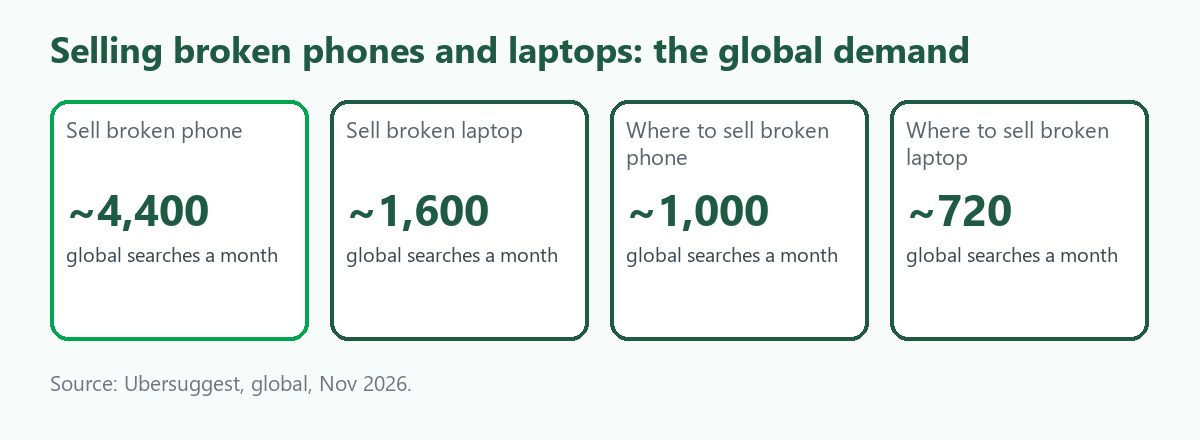
"Sell broken phone" is searched about 4,400 times a month worldwide, according to Ubersuggest, with "sell broken laptop" about 1,600, "where to sell broken phone" about 1,000 and "where to sell broken laptop" about 720. The cost per click for the phone terms is about 2 dollars, and the searchers want one answer: can this be sold, and what must be done first. The part that matters most is the one they rarely search for, which is getting personal data off a device that may not even switch on. This guide explains what to do before any sale, what a factory reset does and does not guarantee, how buyers grade a faulty device and when to recycle instead. It builds on selling old electronics and our worldwide electronics guide, and our Australian companion covers broken or old laptops. We give no prices. ScrapTrade benefits from scrap trading, and that is a conflict you should weigh.
What a reset does and does not do
The sources we found are vendor and university guidance and not the standard itself, so check the primary text. NIST's media sanitization guideline distinguishes levels of data removal, and the summaries we read said:
- A factory reset is generally a "Clear" level. One vendor guide says that for phones Clear is often the only option available. Another says the assurance depends on the device's design.
- Cryptographic erase is the stronger route for phones. It destroys the encryption keys so the data cannot be read, and works only if the data was encrypted. The advice is to confirm the device is encrypted, then reset so the key is discarded.
- Backed-up keys weaken it. NIST warns that cryptographic erase may not suit devices whose keys were backed up, escrowed or stored elsewhere, which matters for managed work phones.
- Flash storage carries residual risk. One summary says NIST warns of unintended disclosure when Clear is used on modern magnetic and flash media.
- The revision is unclear. One vendor says a second revision was published in September 2025, while others cite the first, so check NIST's site.
For sensitive data, rely on encryption and a reset, and for the highest-risk data, consider physical destruction of the storage.
Step by step before you sell
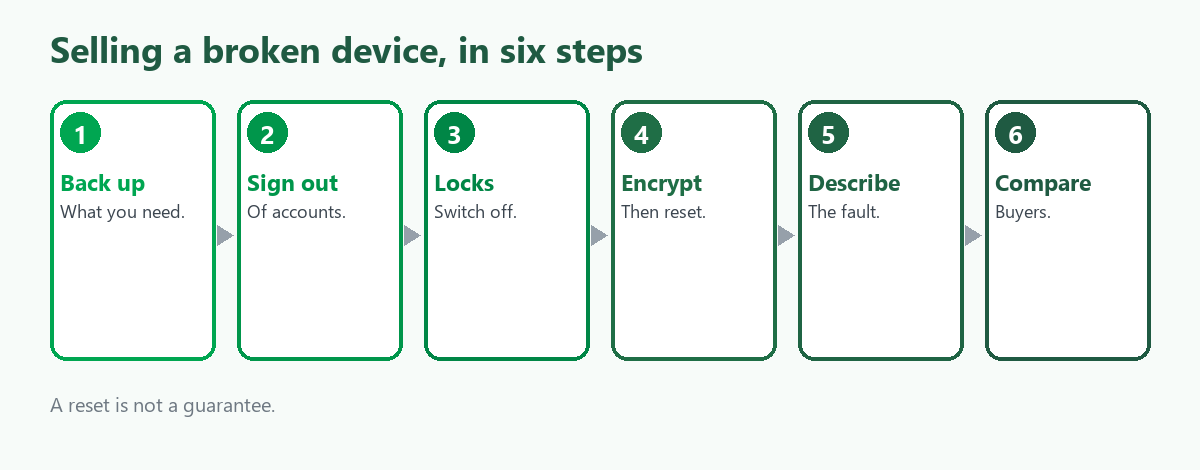
- Back up what you need. Once you wipe, it is gone.
- Sign out of accounts. Cloud, store and messaging accounts tied to the device.
- Switch off activation locks. Features such as Find My and Google's factory reset protection can make a device unusable to the buyer, and buyers check for them.
- Encrypt, then reset. Confirm encryption is on, then perform the factory reset.
- Describe the fault honestly. Cracked screen, dead battery, water damage, will not power on.
- Compare buyers. Quotes assume a condition, and a device that is worse than described is re-quoted.
When the device will not switch on
A dead phone or laptop cannot run a reset, so its data is still on the storage. We found no source on this case, and in our reading the options are to have a buyer or recycler confirm in writing how they will destroy or wipe the storage, to remove the storage drive if it is removable, as in many laptops, or to destroy it physically. Do not hand over a dead device with its data intact to a buyer who cannot say what will happen to it. Our guide to e-waste certification explains how to ask a recycler about data destruction.
How buyers grade a broken device
Sources we read in earlier research for our Australian guides describe buyers pricing by function and condition: whether it powers on, the screen, the battery, the water indicators and whether it is locked. They quote on your description and re-grade on inspection. We found no reliable prices, so we give none. Ask whether the offer can change on arrival, who pays for shipping and what happens if you decline.
Where ScrapTrade fits
ScrapTrade is not a trade-in service, and a single broken phone or laptop is better handled by a repairer, a mail-in buyer or a recycler. The marketplace suits sellers with quantity: a repair shop with a bin of dead boards and screens, a business clearing retired fleet devices, or a reseller with a mixed lot. E-waste is one of its twelve categories and its verified traders in more than 50 countries bid for lots, with no listing fee or commission and live negotiation. An accepted bid holds the buyer's 5 percent deposit in escrow. Businesses and individuals can sell once verified. How data security is handled on devices in a lot is unconfirmed, and wiping is the seller's job, so ask cs@scraptrade.com.au first.
What we could not verify
- The standard's text and current revision. We relied on vendor and university summaries.
- How to handle a dead device's data. We found no source and give our reading.
- What broken devices sell for.
- How ScrapTrade handles data on devices in a lot.
Frequently asked questions
Can I sell a broken phone?
Often yes, to repairers, mail-in buyers or recyclers, priced on condition. Wipe the data, sign out and disable activation locks first.
Is a factory reset enough?
It is generally a basic level of erasure, and encryption plus a reset is stronger. For sensitive data, consider destroying the storage.
What if my laptop will not turn on?
You cannot run a reset, so ask the buyer how the storage will be wiped, remove the drive if possible, or destroy it.
Can I list broken devices on ScrapTrade?
E-waste is a category, and verified businesses and individuals can sell. Data handling is the seller's job, and we could not confirm other details, so ask support.
Sources
- Ubersuggest keyword data, global, queried November 2026.
- Vendor and university guidance on NIST SP 800-88 media sanitization, Clear and cryptographic erase for phones, as summarised in search results.
- Buyer and recycler grading descriptions, as summarised in earlier research for our Australian guides.
- ScrapTrade website, accessed November 2026.
General information only, not security or legal advice. Erasure assurance depends on the device.